Skip to content

RECORDING

Bring every source into a governed communication record.

Voice, screen evidence, historical archives, and live call state enter the same customer-controlled hub, with explicit boundaries between available integrations and roadmap work.
ScalloRECORDING

GOVERNED
COMMUNICATION RECORD

Participants
123, 456
Timing
—
Direction
123 → 456
Status
Active
Voice, screens, and imported recordings become one permission-ready communication record.

CAPTURE VOICE

Voice capture for PBX, SBC, and SIP environments.

Scallo records calls from supported PBX, SBC, and SIP environments and correlates the captured media with available signaling and call metadata.

Each completed interaction contains the recording, participant and number identities, direction, timestamps, source context, and processing status. These records can be searched and played according to user permissions, transcribed, exported, or delivered to downstream systems through APIs.

RECORDING

SIPREC

Standards-based session recording

Receives recording sessions and metadata from supported SBC or PBX recording sources.

Specifications & numbers

Current verified technical scope.

These figures describe current media, policy, and scale-out capabilities. Source availability remains integration-specific.

1,000+
Concurrent recording sessionsScale out across multiple recording servers as demand grows.
3Decoded RTP codecs
3Storage / decoding formats
2Participant channels*
3Recording modes
3Call directions
9Policy scopes
Decoded RTP audio
CodecEncodingStatic PT
G.711 µ-lawPCMU0
G.711 A-lawPCMA8
G.722G7229
Storage & decoding formats
FormatTypeCurrent use
WAVPCM audioSource / fidelity
MP3Compressed audioPlayback / export
OpusCompressed audioStorage / decoding
Recording policy
ModesRECORD_ALL · ON_DEMAND · DISABLED
DirectionsINBOUND · OUTBOUND · BOTH
ExtensionNumberNumber prefixUserDepartmentRoleDeviceTrunkProvider group

Capacity: 1,000+ refers to platform-level scale-out across multiple recording servers, not a fixed limit for one server. Deployment size is matched to customer requirements and validated integrations.

02
Capture Screen

Preserve what happened on screen.Not only what was said.

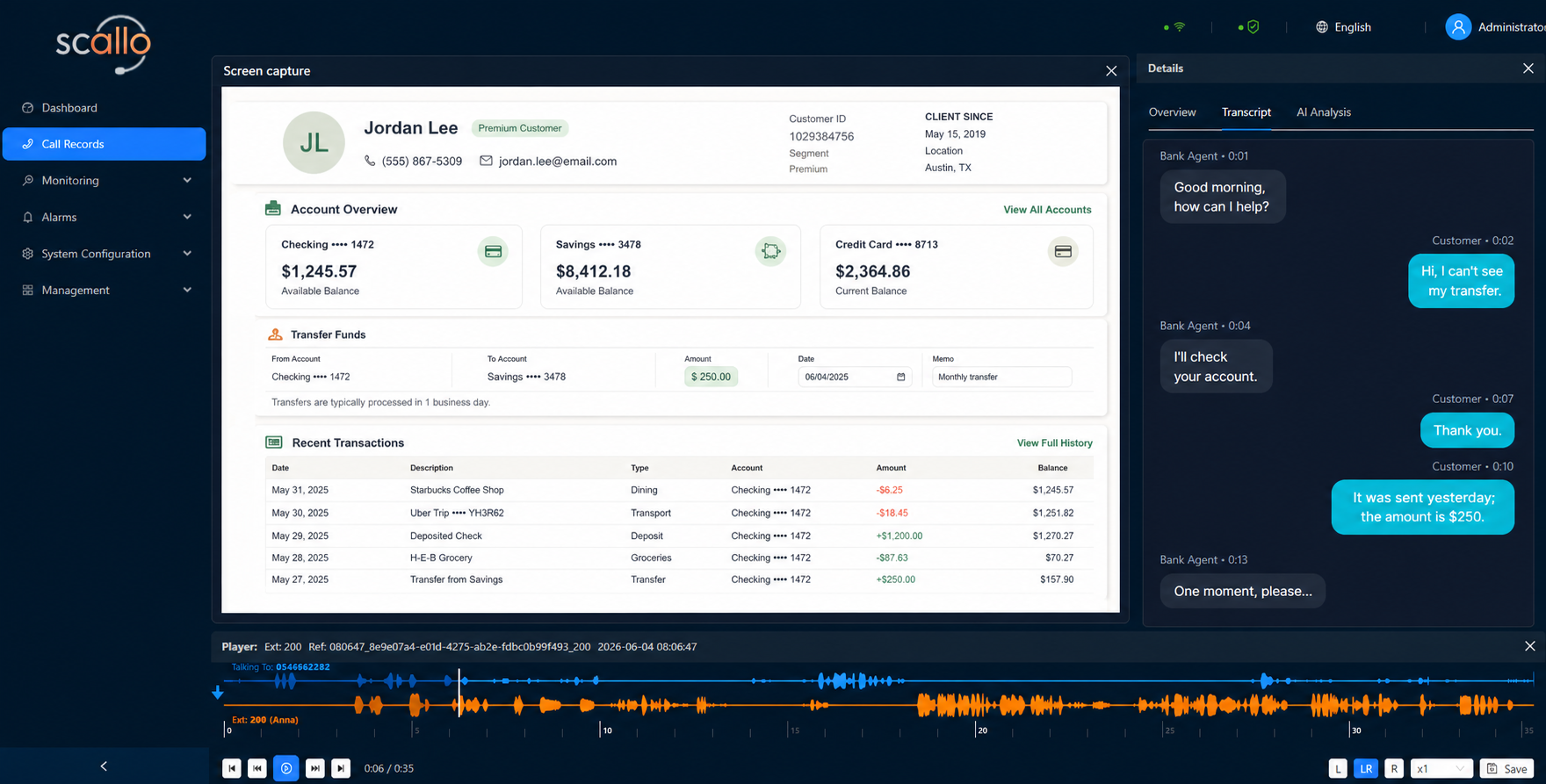
Scallo Screen Recording runs on the agent's Windows 10 or Windows 11 workstation. The client-side recorder follows the communication session so desktop activity and the related voice interaction can be reviewed together. Completed screen recordings are transferred to Scallo, linked to the correct interaction, and governed by the same search, playback, access, retention, and export controls.

Client-side recordingWindows 10 / 11Call-synchronizedVoice + screenAutomatic transferCentral playback
Agent working at a desktop workstation
Scallo Screen capture workspace with transcript and timeline
Details

SHARED INTERACTION TIMELINE

Voice and desktop evidence remain time-aligned.
VoiceCall startCustomer verificationCall end
ScreenApplication openedForm submittedSession closed

CLIENT-SIDE RECORDING

Capture, connect, transfer.

  • Windows 10 / 11Record supported agent workstations where business applications are used.
  • Call-linked contextPreserve the related user, workstation, extension, and communication identity.
  • Reliable transferResume delivery after temporary interruption and report media requiring attention.

CENTRAL REVIEW

One interaction, one review path.

  • Shared identity and timingScreen media remains connected to the corresponding voice interaction.
  • Synchronized replayReview desktop activity against the exact moment in the conversation.
  • Unified lifecycleSearch, permissions, retention, and export apply to voice and screen together.

Import Recordings & CDR

Bring historical recordings into Scallo.

Import existing recordings and associated call-detail records from supported external systems.

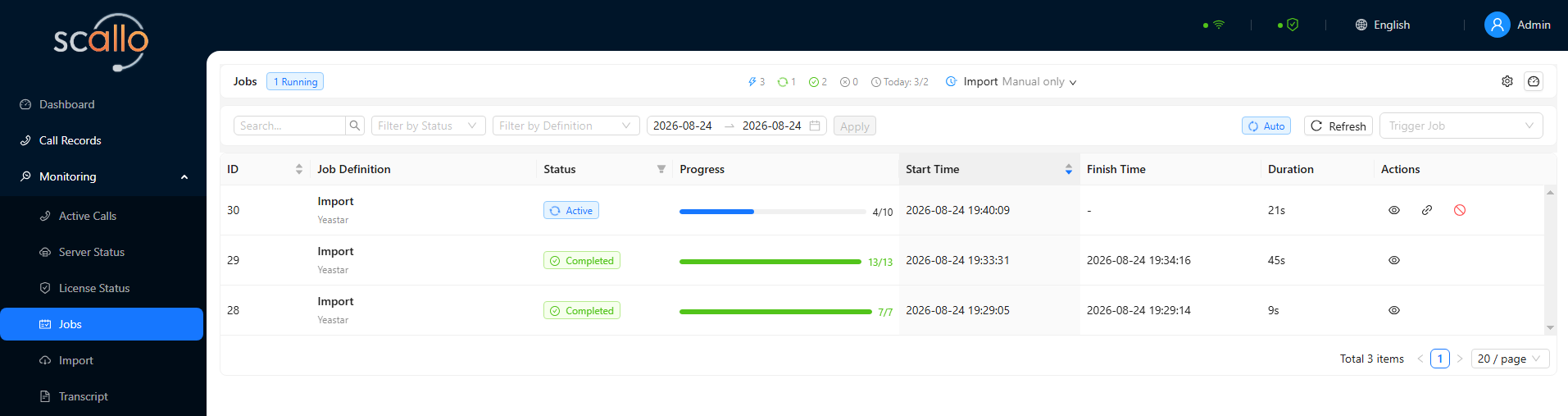
Scallo retrieves recording history, connects each media file to its call information, and maps date, time, participants, numbers, direction, extension, and source. Duplicate detection prevents the same recording from being imported twice.

Scallo Jobs workspace showing active and completed recording import jobs with progress, timing, and actions

Live Call Monitoring & Streaming

Monitor live interactions.Stream live data to connected services.

See active calls in the Scallo workspace and securely share approved live data with connected services.

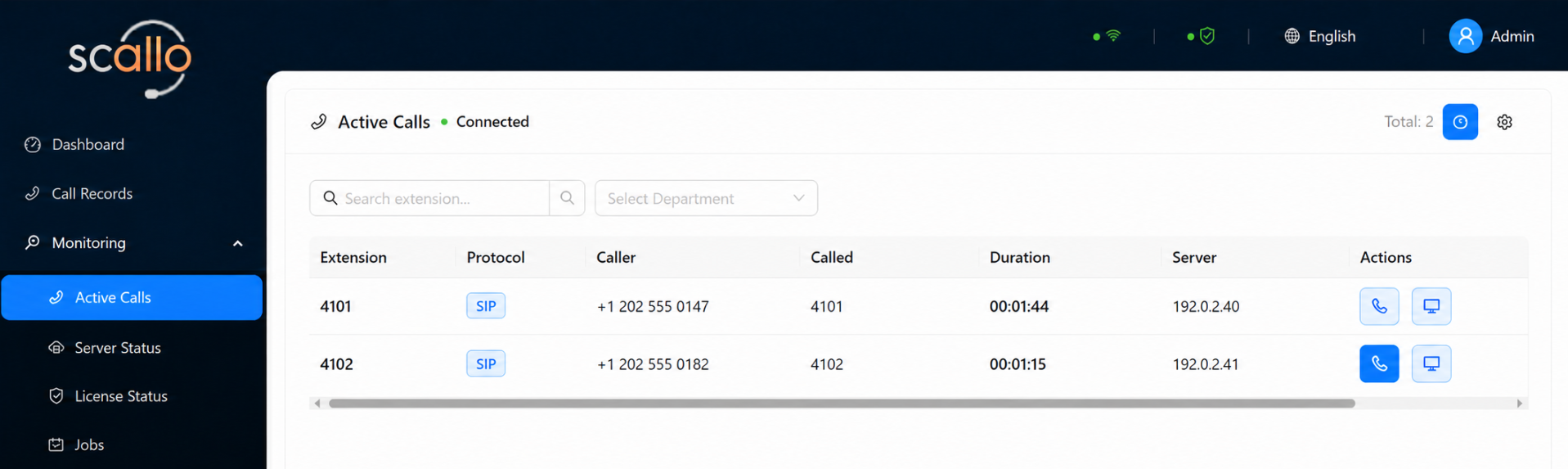
Operational teams can follow the active interaction, its source, timing, recording state, and correlation identifiers. Authorized live sessions apply the same access controls and audit expectations as the rest of the communication-data platform.

Scallo Active Calls workspace showing active call records and authorized listening and live screen actions

Accessibility settings

Adjust your reading experience. These tools do not change text inside product screenshots.

Text size

Your device’s reduced-motion preference is also respected.

Settings apply now but are not saved for future visits. You can change this in Cookie settings.

Accessibility statement & help